
ENCY Software has released ENCY 3.0, ENCY Robot 3.0 and ENCY Tuner 3.0, introducing new machining strategies, robot motion capabilities, AI assistance and workflow automation.
Released on September 14, ENCY 3.0 gives programmers greater control over complex machining through features including complete tool assembly management, new finishing strategies and robot motion with external axes. Macros are designed to automate repetitive tasks, while the CAM Agent (Beta) assists with project preparation and analysis.
The new release also expands ENCY’s working environment through its Extension Store, which allows users to add specialised capabilities and enables dealers and customers to share extensions. The Digital Machine Center provides components for specific CNC machines, while the updated ENCY Clouds supports project review and browser-based collaboration.
From Tool Assemblies to Finishing
Tooling in ENCY 3.0 is built around Tool Assemblies that combine holders, adapters, and cutting components. Programmers can build and modify assemblies directly in the 3D environment, in the context of the part and machine. The actual assembly geometry is used for simulation and collision checking.
The new Combo Finish operation combines Plane, Waterline, and Scallop strategies. Steep and shallow areas can be machined with different strategies within a single operation. Smoother zone merging and connected passes reduce unnecessary transitions, while parallel calculation speeds up toolpath generation.
The dedicated Blade Machining operation introduces strategies for blade airfoils, root zones, hubs, and edges. The Swarf operation has also been reworked for five-axis flank milling.
The rebuilt Feeds & Speeds calculator determines cutting conditions based on the tool, workpiece material, and machining method. Programmers can use data from Walter, Kennametal, and Sandvik and build their own cutting-data libraries. Calculated values are sent directly to the operation.
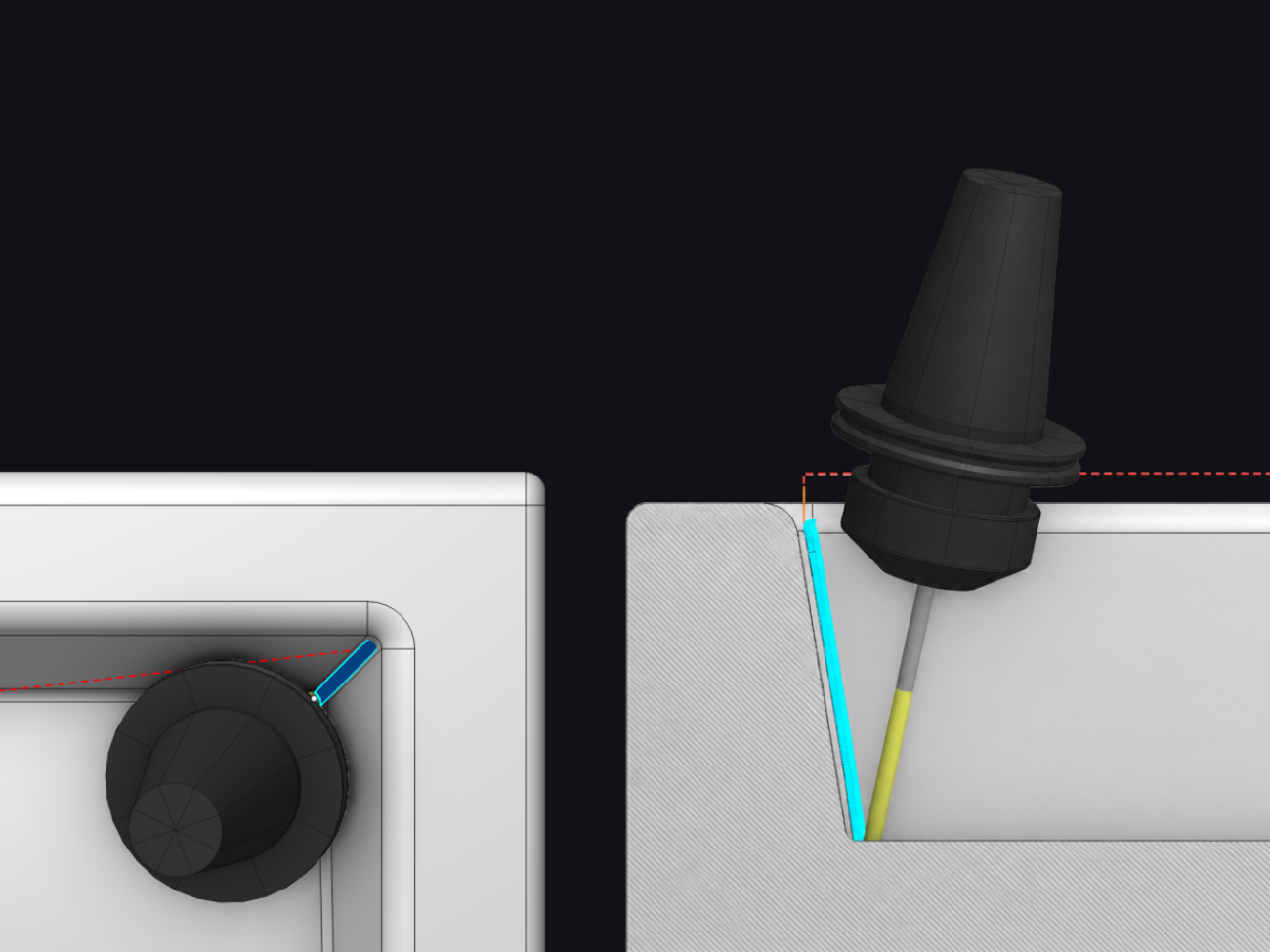
Adaptive Tilting automatically adjusts tool tilt in two directions to avoid holder collisions, including during linking moves between cutting passes.
Robotics, Laser Cutting, and Additive Manufacturing
The improved Smart Motion functionality in ENCY Robot 3.0 calculates trajectories for 5D and 6D operations without requiring a manually created axes map. It accounts for axis limits, collisions, and singularities. Programmers can still use the axes map to fine-tune the resulting motion.
For laser cutting, ENCY 3.0 automatically recognizes holes, slots, and other standard contours, reducing manual toolpath preparation. Recognized features can be edited and used to generate compact NC programs with machining cycles, where supported by the postprocessor.
For additive manufacturing, the new Radial Slicing strategy builds layers around an axis for ring-shaped, partially open, and helical parts. Additional controls for infill, power, and layer time give programmers greater control over material deposition.
The new Nesting module in ENCY Design automatically arranges contours on sheet material according to specified spacing and rotation rules. It reduces layout preparation time and material waste for laser, plasma, waterjet, and oxy-fuel cutting.
AI Working Alongside the Programmer
CAM Agent (Beta) works with the project open in ENCY. Users can ask it to recognize machining features, select tools and cutting conditions, create operations, calculate toolpaths, or troubleshoot a simulation issue. Requests are made in plain language, and the user remains in control of the assistant’s actions.
For repetitive tasks, Macros let users record a sequence of actions, edit it, and apply it to similar projects.
The new ENCY Extension Store lets users find, install, and update add-ons directly in ENCY. These extensions address specific production tasks. For example, users can install CAM Agent (Beta) for AI assistance or Support Generator to create support fixtures from a part’s 3D model and generate nesting layouts for cutting their components from sheet material.
Dealers and customers can also develop and share their own extensions, drawing on firsthand knowledge of what their production workflows need. The AI-based development toolkit and ENCY API make it easier to turn that knowledge into practical tools for automating tasks, connecting systems, and adding specialized CAM capabilities.
NC Program Verification in ENCY Tuner 3.0
ENCY Tuner 3.0 supports multi-part and multi-channel simulation. The interpreters for HEIDENHAIN iTNC 530 and FANUC 30i milling controls have also been improved.
ENCY Clouds: Review Projects and Collaborate in the Browser
The web version of ENCY Clouds features a completely redesigned project viewer. Flexible, informative panels make it easier to inspect the model, tools, operations, and machining parameters. Colleagues and technical support teams can use this shared view to discuss machining tasks and resolve questions without opening the project in the ENCY desktop application.
Digital Machine Center: Get ENCY Ready for Your Equipment
The new Digital Machine Center brings together the components needed to program and simulate a specific CNC machine: postprocessors, machine kinematic models, NC code interpreters, and complete Machine Kits. The catalog is available on the web and within ENCY. Users can search by machine, controller, and component type to find a suitable solution, review its specifications, and use it in their projects.
ENCY Software is building and expanding the catalog, and dealers can contribute their own solutions, making these resources available to users in one place. This helps users spend less time sourcing the components they need. Active maintenance provides full access to the entire catalog. Users with trial licenses or licenses without active maintenance receive trial access to the content.
ENCY 3.0 at IMTS
ENCY 3.0 is making its U.S. debut at IMTS 2026 in Chicago. From September 14–19, the ENCY Software team is demonstrating the new release at Booth 135750, East Building, Level 3.