


The metal forming simulation tool with a practical focus for economical productivity is finally here. Dynaform 7 adds a powerful new Die Face Design module, allowing for easy and intuitive die-face creation. Engineers can quickly simulate and evaluate designs for a more reliable, efficient process that speeds up the estimation and tool-building process.
Die Design Made Easy
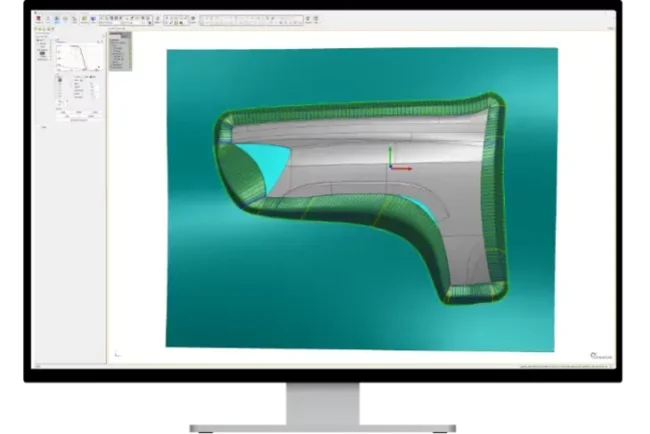
The complete die face engineering package facilitates tooling design by using the part geometry. Offers a NURBS surface-based infrastructure and interfaces with all major CAD codes to produce high quality CAD surfaces.
Automated tools minimize design work
Generate and finely tuned binder surfaces, addendum profiles/surfaces, PO line and layout draw beads using automated tools in CAD surface and CAE mesh environments. Minimize die design work with automated tipping, reverse trimming, undercut/draw depth calculation, fileting, and un-flanging.
Use part geometry for binder and addendum surface generation
Create, edit and morph binder surfaces using part geometry with the addendum generator. Create a series of profiles base on draw depths and part shape between the binder and the die cavity. Mesh and surface the profiles to create a complete addendum for forming, and edit using interactive functions or by adjusting the shape of the PO line.
Parametrically define addendum profiles
Addendum profiles are parametrically defined for quick adjustments by editing parameters
Associativity automatically extends changes
Parametrically defined surfaces and profiles mean binder surfaces, addendum profiles/surfaces and PO line are fully associated. Modify one entity and it automatically extends to the other entities.
Efficiency and profit-driving modules that Dynaform has delivered for 30 years
TBF / Tube Bending & Forming
Process setup and simulation for tube-bending and forming processes. Based on product geometry, TBF can automatically (or manually) setup tube-bending and hydroforming processes, generating tooling and validation processes.
- Automatic Bending Process
- Bending Table Tools
- Geometry & Automation Tools
- Center Line Calculation
Formability Simluation

Dynaform’s forming simulation software makes it possible to uncover design flaws early in the process. Using the various modules, engineers can more-fully evaluate alternative–and unconventional–designs. Doing so helps ensure higher-quality outcomes.
- Springback
- Springback Compensation
- Drawbead Optimization
Blank & Trimeline Development

Determine a blank’s optimal shape and size before producing any physical parts. Accurately predict the deformation, thinning, and stretching that will occur during the forming process to determine the initial size and shape of the blank. Predict the final shape and contour of a part after trimming, ensuring that final part meets your specifications and quality standards.
- Automatic Iteration and Optimizations
- Industry Leading Accuracy
- Simple Setup Process and Interface
BSE / Blank Size Engineering
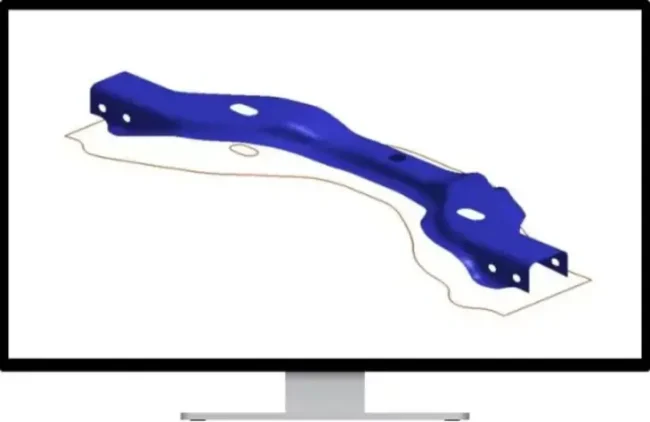
Process setup and simulation for tube-bending and forming processes. Based on product geometry, TBF can automatically (or manually) setup tube-bending and hydroforming processes, generating tooling and validation processes.
- Deep Drawing
- Line Die
- Progress Die Support
Your high-performing engineering teams can reach new levels of productivity
Tooling Designers
Experiment and fine-tune tooling is a way that saves time and cuts costs. Dynaform 7 allows you to try, evaluate and modify various scenarios before putting them into practice.
- Hit Your Deadlines
- Reduce Die Design Time
- The Right Die, The First Time
Estimators
Dynaform7 gives you transparent and fast insights that allow you to quickly and accurately estimate part production costs for feasible designs, including the expected rejection rate.
- Quickly Assess Project Feasibility
- Generate Quotes Quicker
- Reduce Project Timelines
Management
With clarity and a predictable process, you will be able to manage an efficient process and focus on building your business.
- Expand Marketshare
- Win More Bids
- Increase Profitability