

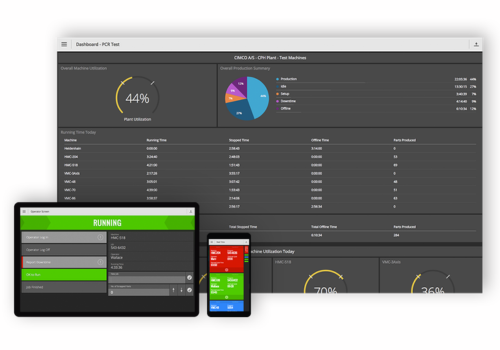
CIMCO has introduced Historical Dashboards in its MDC-Max Web Client, enabling manufacturers to analyze historical production data directly within the browser environment.
While live machine monitoring remains essential on the shop floor, long-term production stability depends on understanding performance trends over time. With the new Historical Dashboards feature in MDC-Max, users can move beyond real-time data and evaluate past production metrics to detect performance drift, compare shifts, and identify deviations before they escalate into operational issues.
The web-based dashboards eliminate the need to export data or switch between applications. Users can freely select machines and define time ranges, reviewing information across days, weeks, months, or even years. Data can be displayed as charts for trend analysis or tables for detailed value inspection, depending on operational requirements.
In addition, dashboards are fully configurable to align with production workflows. Layouts and widgets can be tailored to individual roles and work environments, ensuring that relevant information is presented clearly and is immediately actionable when performance adjustments are required.
New features and improvements
In addition to the core dashboard functionality, the overall experience has been significantly improved since Historical Dashboards were first introduced last year. Dashboard configuration is now more consistent and predictable, with improved visual feedback and smoother widget behavior when adjusting layouts. Widgets adapt to their content, reducing the need for manual layout adjustments and making dashboards easier to maintain in daily use.
Alongside these usability improvements, several new features have been added that extend how dashboards can be used and integrated.
Search Table Widget
A new Widget type that displays data in a searchable, filterable, and sortable table. Intended for detailed inspection of historical data where exact values are required rather than graphical trends.
Print Dashboards to PDF
Dashboards can be printed directly to PDF while preserving layout and structure. This supports use in reports, documentation, and reviews.
Export widget data to CSV
Data from individual widgets can be exported to CSV format for further analysis in external applications such as Excel or for use in reporting workflows.
URL parameters
Dashboards support URL parameters for predefined machines, time ranges, and context when opening a dashboard. This allows dashboards to be linked directly from MDC-Max, other web clients, operator screens, or desktop shortcuts, so the relevant data opens immediately without manual selection.
Chart groups for bar charts
Bar charts support chart groups, allowing related data series to be grouped and compared within the same visualization.
Drilldown (in development)
Beyond the recently added features, we continue to focus on improving Historical Dashboards. Current work is nearing completion on widget-level drilldown, allowing users to click into more detailed data directly from individual charts and widgets, reducing the need to manually change selections or time ranges.